Why Your Memphis Website Isn't Generating Leads
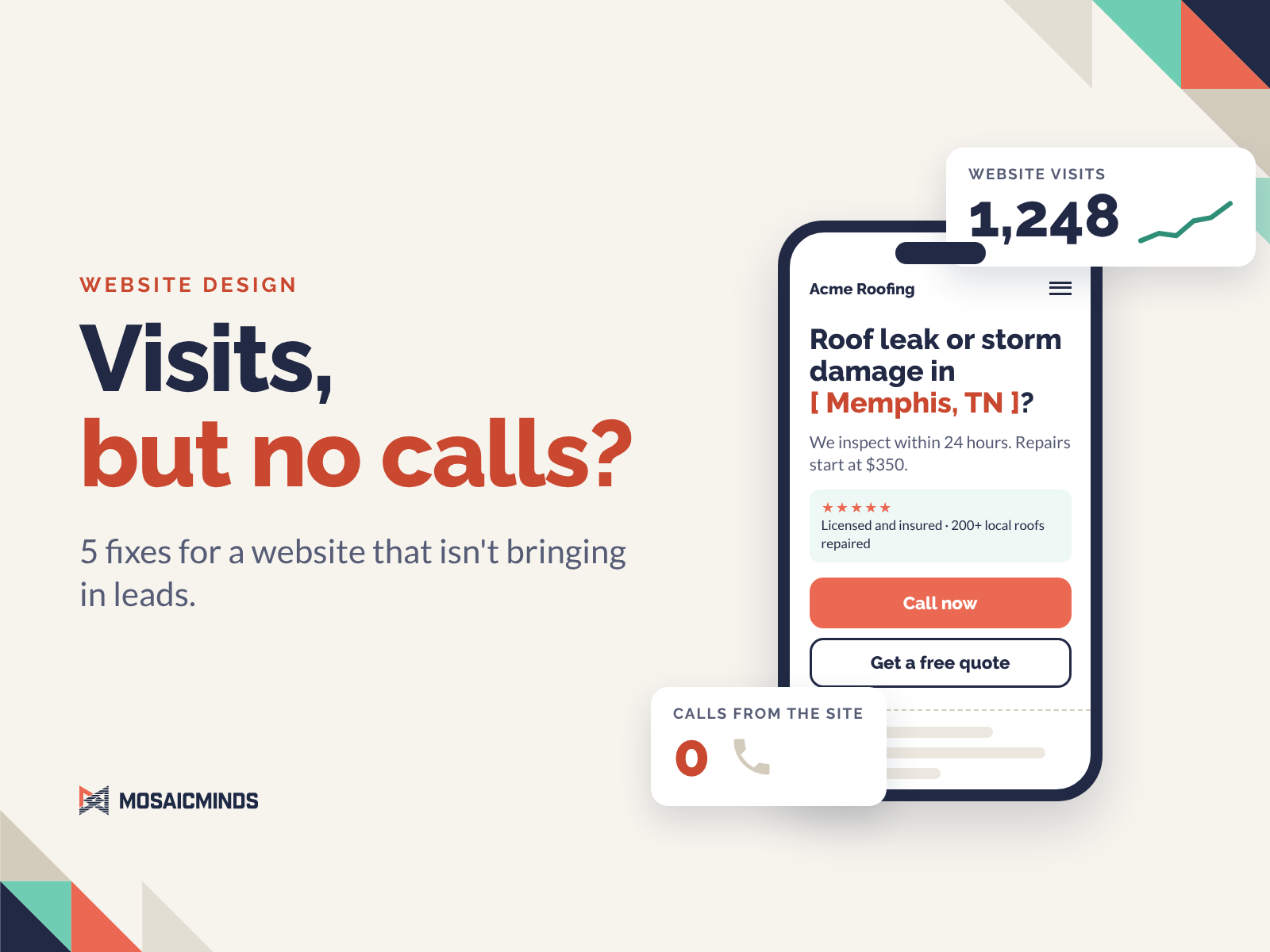
Most Memphis websites that don't generate leads share one problem. They were built to look good, not to get found and get the call.
I'm Marlin Melendez, owner of MosaicMinds in Collierville, TN. I've spent 20+ years in UX, branding, and conversion strategy, and I build websites for small businesses in Memphis and the cities around it.
The short answer: a website that isn't bringing in leads is usually failing at one of five things.
Google and AI tools can't find it.
It doesn't show how you solve the visitor's problem.
It loads too slowly on a phone.
The first screen doesn't earn the scroll.
There is no fast way to reach you.
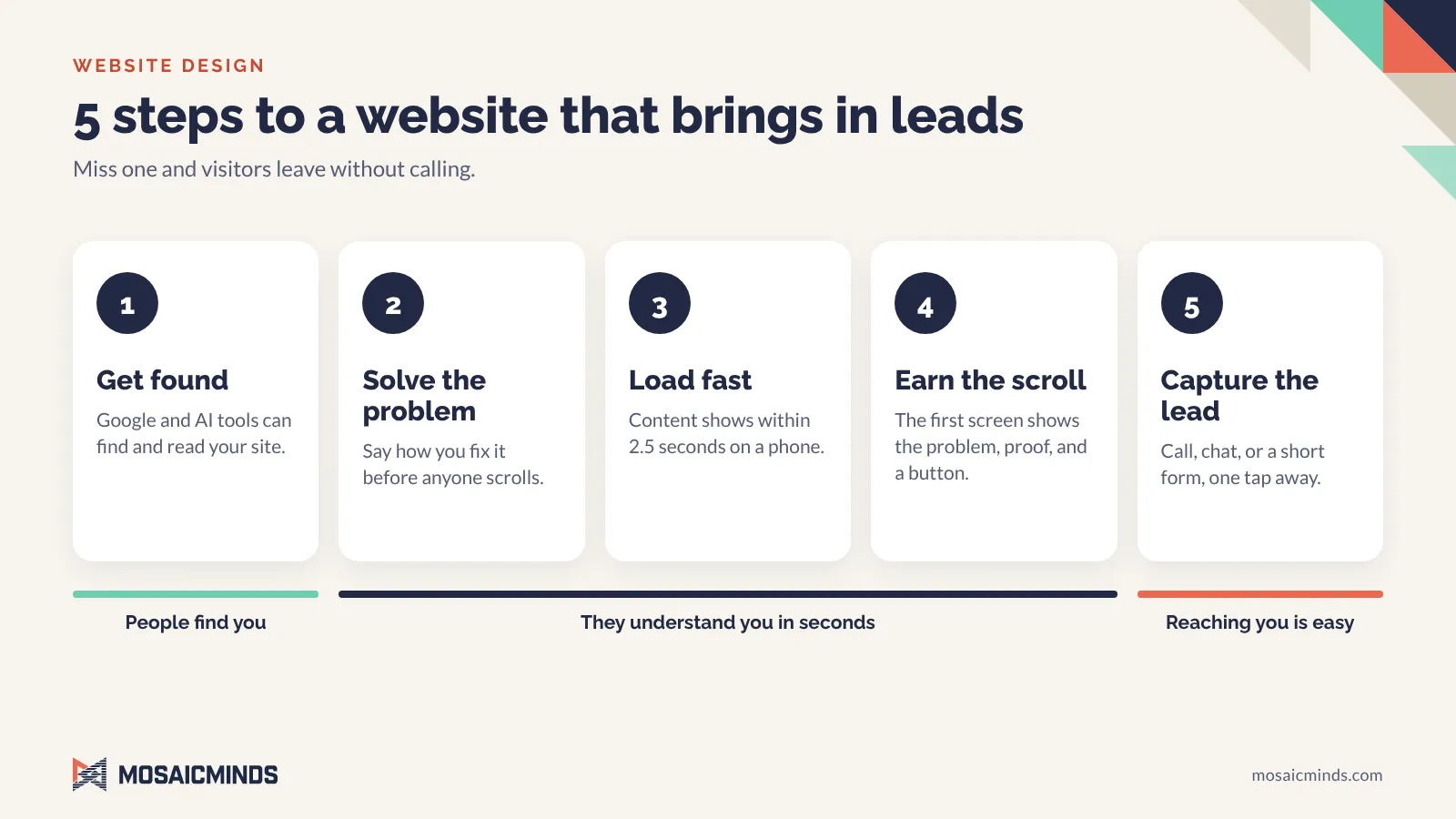
Below is how I fix each one on every build. Many web designers skip at least one. Use it as a checklist for your own site, whether you hire me or not.
A pretty website is not the goal.
I can make a website beautiful. That is not what I'm hired to do. My job is to turn the person looking at your site into a call, a form, or a booked job.
For that to happen, three things have to go right, in this order:
People find your site.
They understand it in seconds.
Reaching you is the easiest thing on the page.
Most Memphis websites lose the visitor at the second or third point. Many never get past the first. Every step below fixes one of the three.
Step 1: Build the website so Google and AI can find it.
A website nobody finds can't convert anybody. Search visibility starts in details your visitors never see, and this is where I find the most skipped work.
Images that are named, sized, and described
File names: Before upload, I rename every image with the service, the business, and the city. roof-repair-acme-roofing-memphis-tn.jpg tells Google something. IMG_4471.jpg tells it nothing.
File size: I compress every image so the page isn't waiting on photos. People will not wait for a slow site.
Alt text: Every image gets a short written description, like "Roofer replacing storm-damaged shingles on a Memphis home." Screen readers read it aloud to visitors who are blind or have low vision, and search engines use it to understand the image.
This is not my opinion. Google's own image SEO best practices recommend short, descriptive file names and call alt text the most important attribute for describing an image.
One H1 per page, with headings in order
Every page gets one H1. That is true for a homepage, a service page, and a blog post. Under it, the H2s, H3s, and the rest follow in order, like an outline. The main keyword goes in the H1. Supporting keywords go in the headings below it. Headings, image file names, and alt text should all point at the same topic, so Google gets one clear picture of what the page is about.
Here is that outline on a roofer's service page:
H1: Roof Repair in Memphis, TN
H2: Roof Leak Repair
H2: Storm Damage Repair
H3: Hail Damage
H3: Wind Damage
H2: What Roof Repair Costs in Memphis
Video gets the same treatment
Video follows the same rules: a descriptive file name, a compressed file, and a setup that doesn't hold up the rest of the page.
Schema markup that tells Google who you are
Schema is code behind the page that states the facts about your business in a format search engines read directly. I add it so Google doesn't have to guess:
Business name, location, service area, phone, and hours
The services you offer
The author behind the content
Your social media profiles and other listings
Google's local business structured data guide requires the name and address, and recommends the phone number, hours, and website URL. When those facts match your Google Business Profile and your other listings, search engines can trust them.
Built to be recommended by AI, not just Google
More people now ask ChatGPT, Perplexity, or Google's AI summaries for a recommendation instead of scrolling through results. Answer engine optimization, or AEO, is the work of making your business the one those tools suggest. That takes clear questions and answers on the page, facts that match everywhere your business is listed, and the schema above.
I also generate an llms.txt file for the site. It follows the llms.txt proposal: a plain-text file at the root of your site that summarizes your business, your services, and your key pages for AI tools. Many web designers have never heard of it.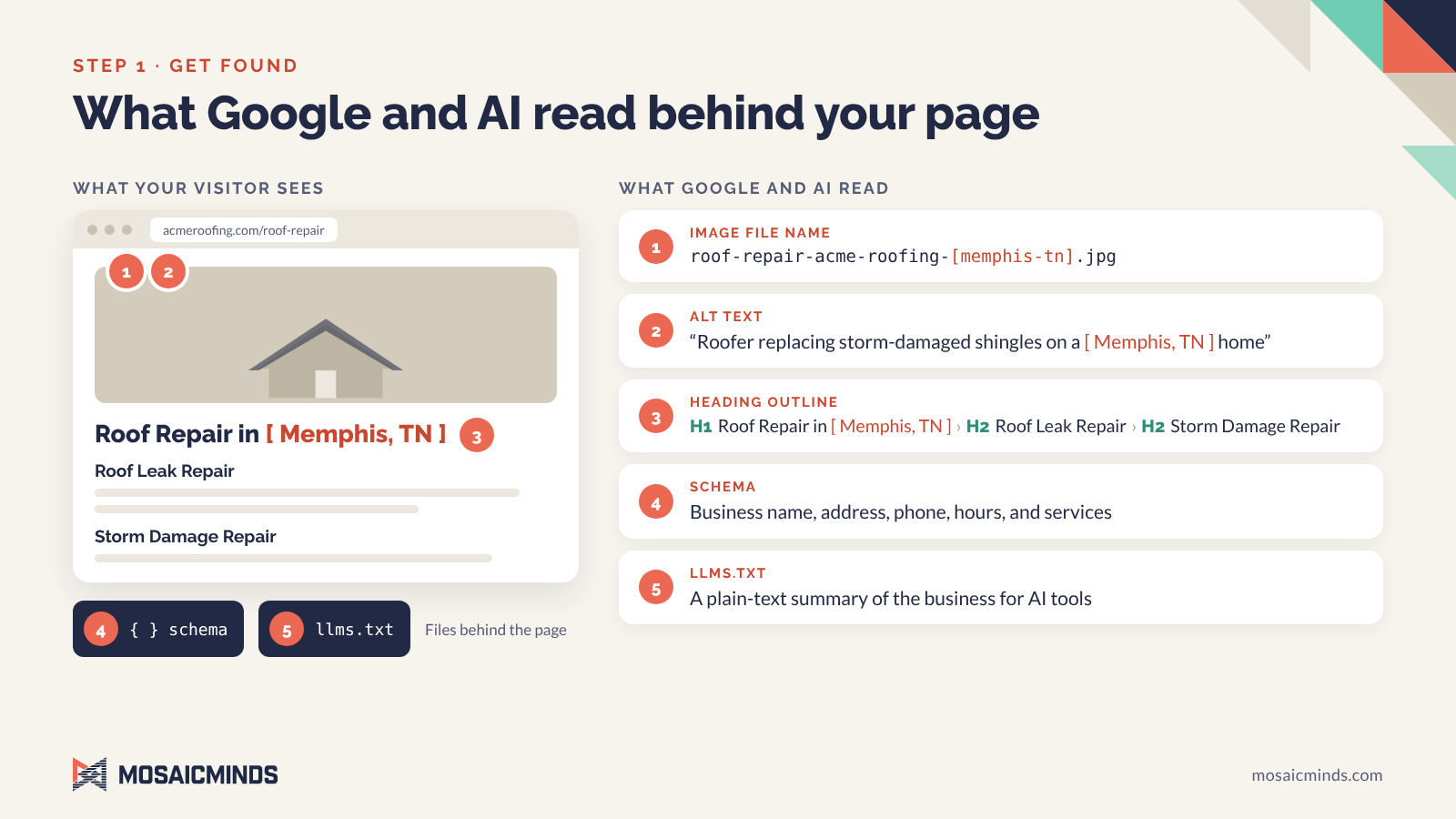
Step 2: Show how you solve their problem before anyone scrolls.
Nobody visits your website to learn about your business. They come with a problem. A roofing customer has a leak or storm damage, and wants it fixed.
People also don't read websites. They scan them. So your page has a few seconds to answer what that customer is really asking:
Can you solve my problem? Name it in their words, like "roof leak" or "storm damage."
How will you solve it better than anyone else?
How fast can you get to it?
What is it going to cost me?
Who are you, and are you near me?
If a visitor has to hunt for any of those, they go back to Google and click the next result.
Here is the difference on a roofer's homepage:
Weak: "Welcome to Acme Roofing. Quality you can trust since 1998."
Strong: "Roof leak or storm damage in Memphis? We inspect within 24 hours. Repairs start at $350."
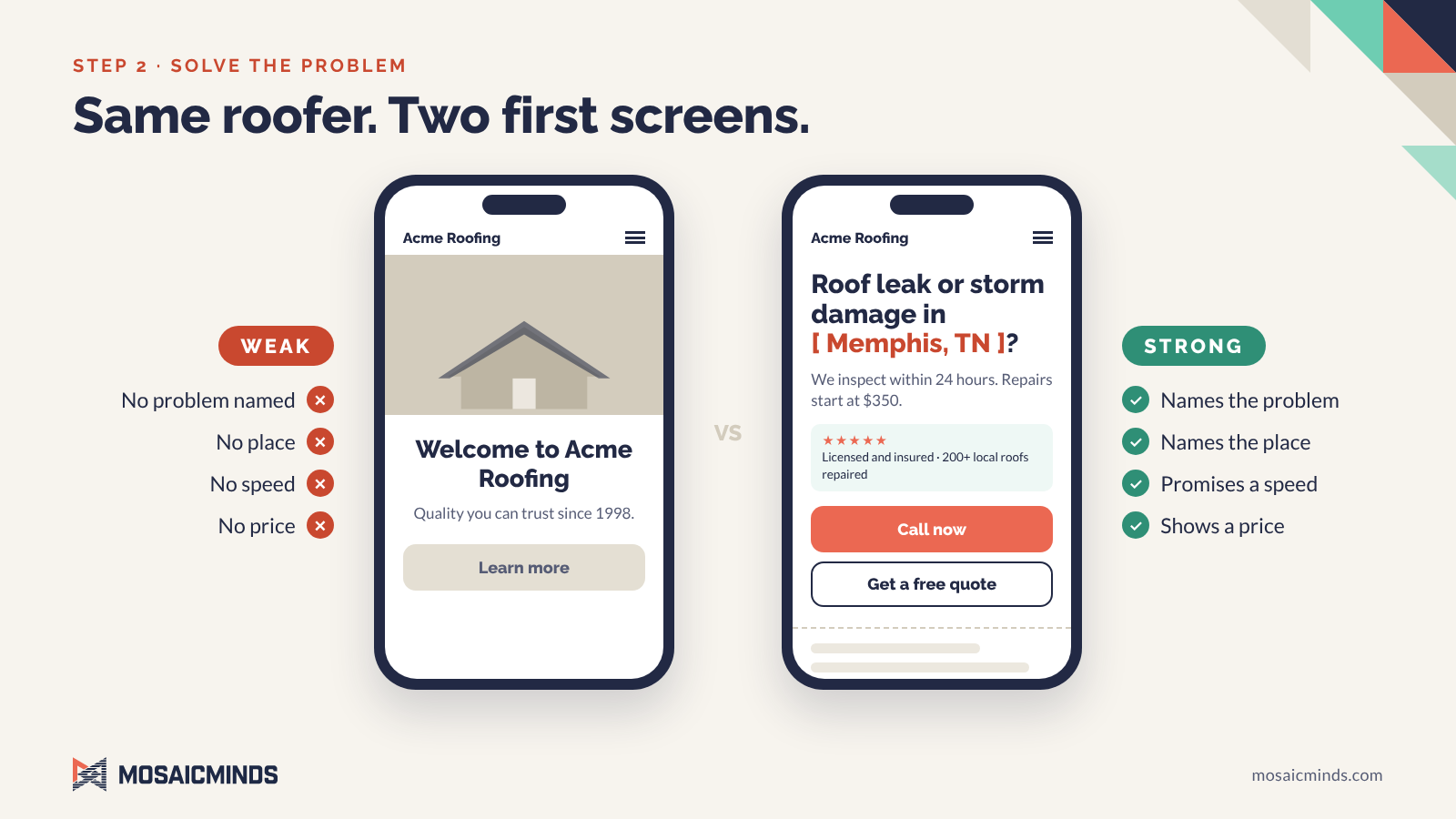
The second one names the problem, the place, the speed, and the price in one breath. So I write and lay out every page for scanning: short paragraphs, clear headings, bullet points, and plain words. A long wall of text does not convert, no matter how well it is written.
Step 3: Make it load fast, especially on a phone.
Many of your visitors are on a phone, often on a cell signal. If the page is slow, they leave before they ever see your offer. Speed comes from how the site is coded:
CSS is compressed. Only the styles needed for the first screen load first.
JavaScript waits its turn. Scripts that would block the page from appearing are deferred.
Animations load on a trigger. They start after the important content is on screen, not before.
Images and video are sized for mobile. That is the work from Step 1 paying off.
My targets are the marks Google's Core Web Vitals call good: main content visible within 2.5 seconds, a response to taps within 200 milliseconds, and almost no layout shifting while the page loads.
Step 4: Design the first screen to earn the scroll
Design still matters. A site has to look professional, or people won't trust it with their money. But the design has a job to do. The first screen on a phone, before any scrolling, has to show:
The problem you solve and where you solve it
One line of proof that you're a safe choice
One clear button to call, book, or get a quote
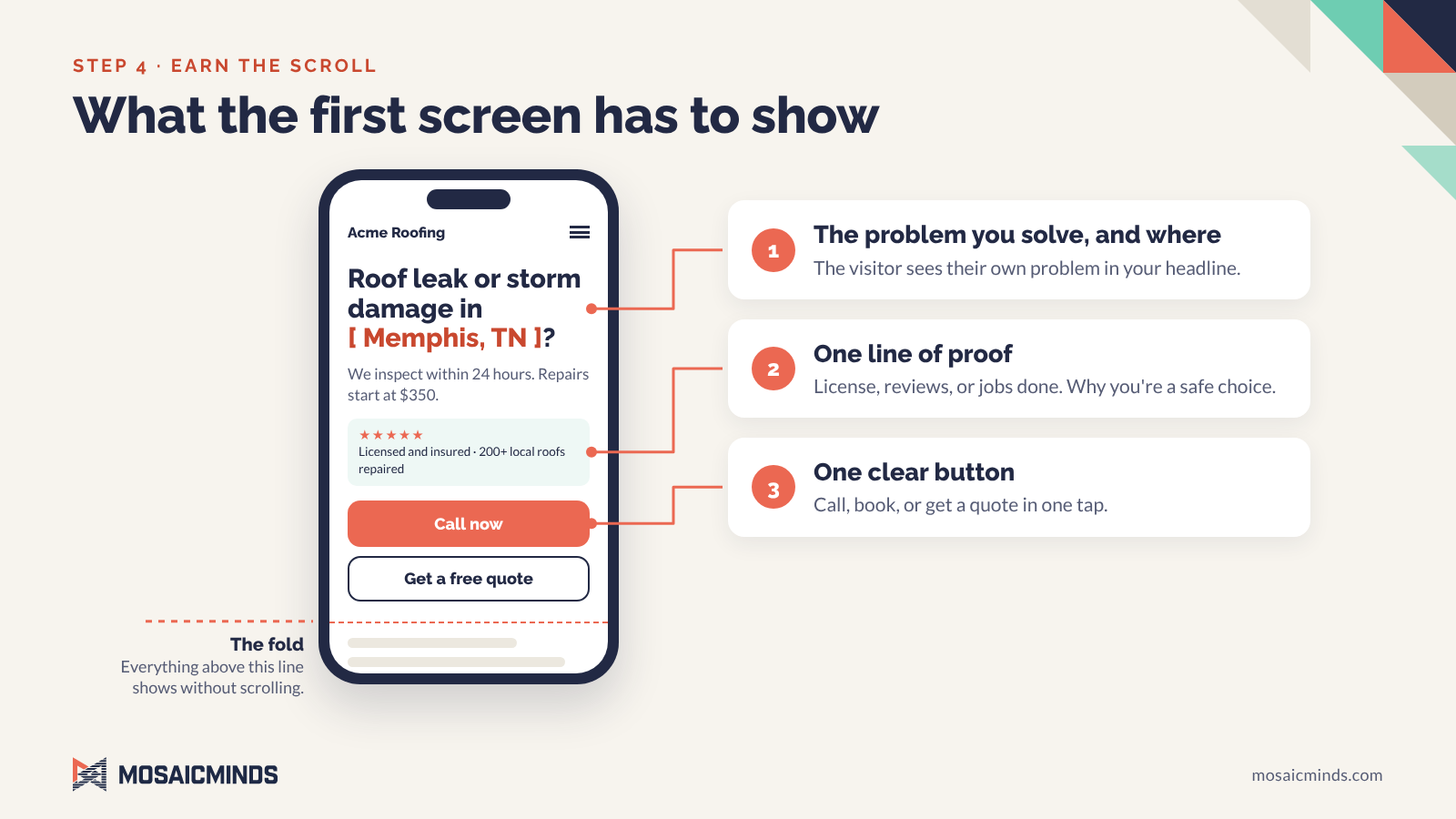
Some visitors decide on that first screen alone. Catch their attention there and they keep scrolling. Miss it and they leave.
Step 5: Capture the lead and answer fast
This is the step most websites miss. A visitor who is ready to act needs a way to reach you right now. You need their name, phone number, and email so you can follow up. Every site I build has tap-to-call buttons and contact forms. Where it fits the business, I add live chat.
Tap-to-call. A phone number that rings you directly from the page.
Live chat. A chat widget that reaches your phone, so you can answer while the customer is still on your site.
A short form. First name, last name, phone, email, and their question. Nothing more.
The business that answers first often gets the job. Your website should make you that business.
When a website isn't enough
Some businesses need customers to log in and do something, like request service or check an order. That calls for a web application. It runs in the browser, so there is nothing to download from an app store. I build those too.
Check your own Memphis website in five minutes
Run these seven tests on your phone. Two or more misses usually explain where the leads are going.
Can people find you? Google your main service plus your city, like "roof repair Memphis." Are you on page one?
Does AI know you? Ask ChatGPT or Google's AI summary for your service in your city. Does your business come up?
Is it clear? Show your homepage to a stranger for five seconds. Can they say what problem you solve and where?
Is the price there? Can a visitor find a price or a starting price without calling you?
Is it fast? Open the site on cell data, not Wi-Fi, and count the seconds until you can read it. Then run it through Google’s free PageSpeed Insights.
Does the first screen sell? Without scrolling, do you see what you do and a button to contact you?
Can they reach you? Tap your phone number. Does it dial? Send your own form. How fast does it reach you?
Questions Memphis business owners ask me.
How much does a website cost?
My website packages start at $2,500 as a one-time fee. No monthly contract is required.
How long does a new website take?
Most sites launch 4 to 8 weeks after kickoff.
Will I own my website?
Yes. The site, the content, and the accounts are all in your name.
Is SEO included?
Basic local SEO setup is included on every build. That covers page titles, descriptions, and your Google Business Profile connection. Ongoing growth work is an optional monthly plan.
Do you use AI tools or human strategy?
Both. I make the strategy and design decisions myself, and I use AI and automation tools where they support growth that lasts.
What areas do you serve?
I'm based in Collierville and work with businesses in Memphis, Germantown, Cordova, Arlington, Millington, Bartlett, and Southaven.
Want a Memphis website that brings in leads?
Start with a free discovery call. I'll look at your current site and tell you honestly whether you need a new one or a better version of what you have.
Call (901) 910-1249 or see my Memphis website design services.
About the author Marlin Melendez is the founder of MosaicMinds, a web design, digital marketing, and AI consultancy in Collierville, TN. She has 20+ years of experience in UX, branding, and conversion strategy, and builds websites for small businesses across the Memphis area and beyond.